One cPanelcPanel The most popular hosting control panel: a website where you manage your email, files, databases and domains with point-and-click tools instead of commands. More about cPanel → account can host several websites. Since cPanel 108, addon domains, subdomains and aliases are all created in one place: Domains. The difference between them is just the name you type and whether the new domain gets its own folder.
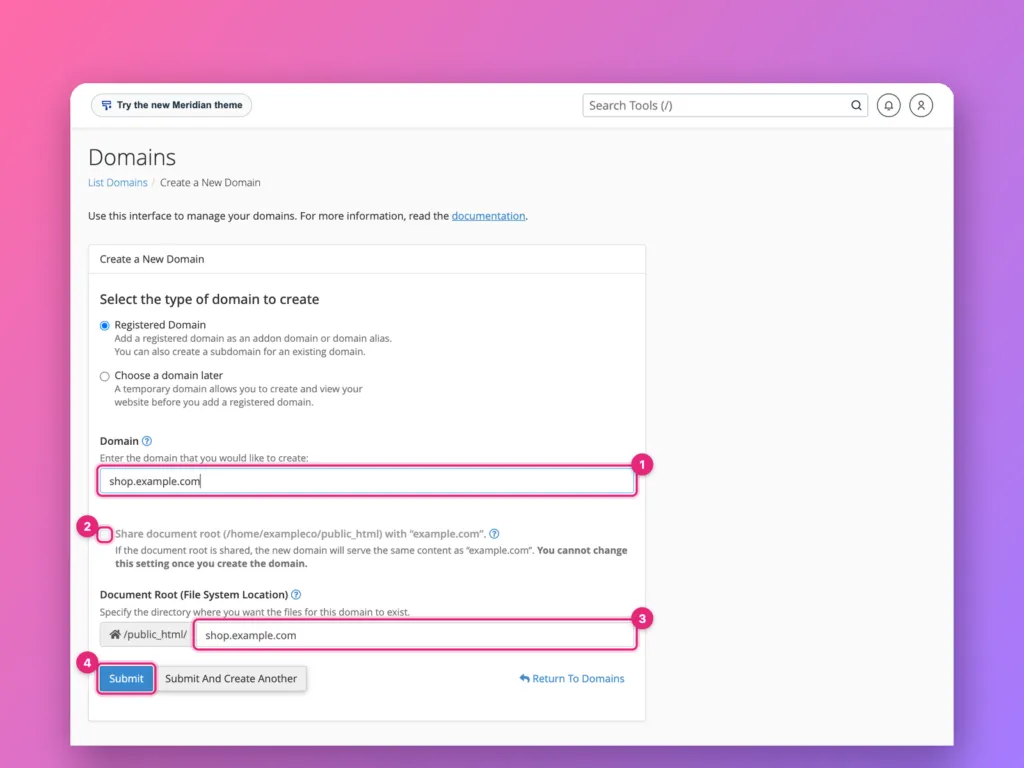
Open Domains » Domains » Create A New Domain, type the full domain or subdomainSubdomain A name in front of your domain, like shop.example.com or blog.example.com. It can show a different site from the main one. More about Subdomain →, untick Share document root to give it its own folder, and click Submit. Then point the domain’s DNSDNS The internet’s phone book. It turns a name people can remember, like example.com, into the number address computers use to find the server. More about DNS → at the server and turn on Force HTTPSHTTPS The secure version of the web, shown by the padlock. Everything sent between you and the site is scrambled so nobody in between can read or change it. More about HTTPS → Redirect once it has a certificate.
The domain list
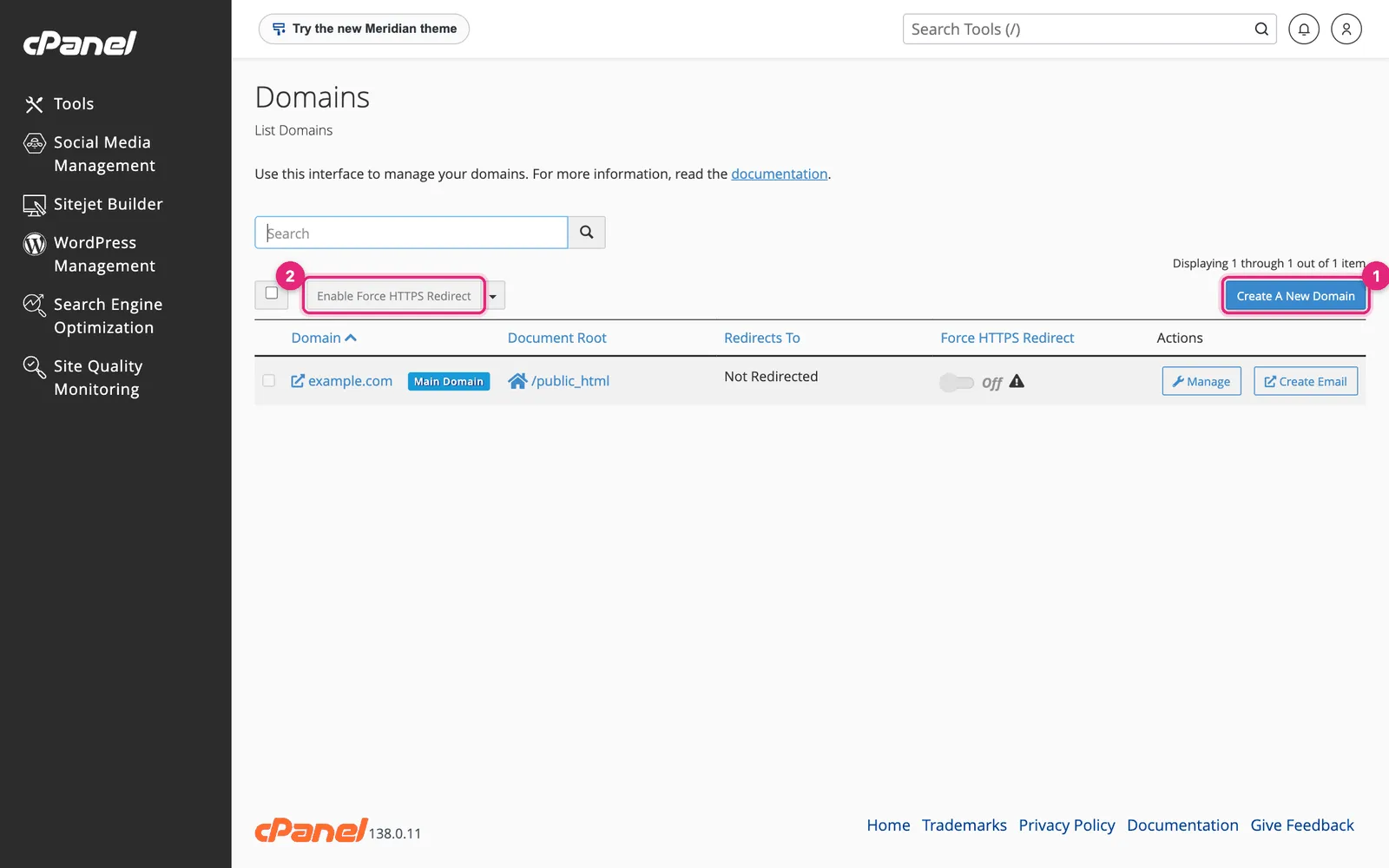
- Create A New Domain adds a domain, subdomain or alias.
- Force HTTPS Redirect sends every visitor to the secure address. Turn it on per domain once a certificate is in place.
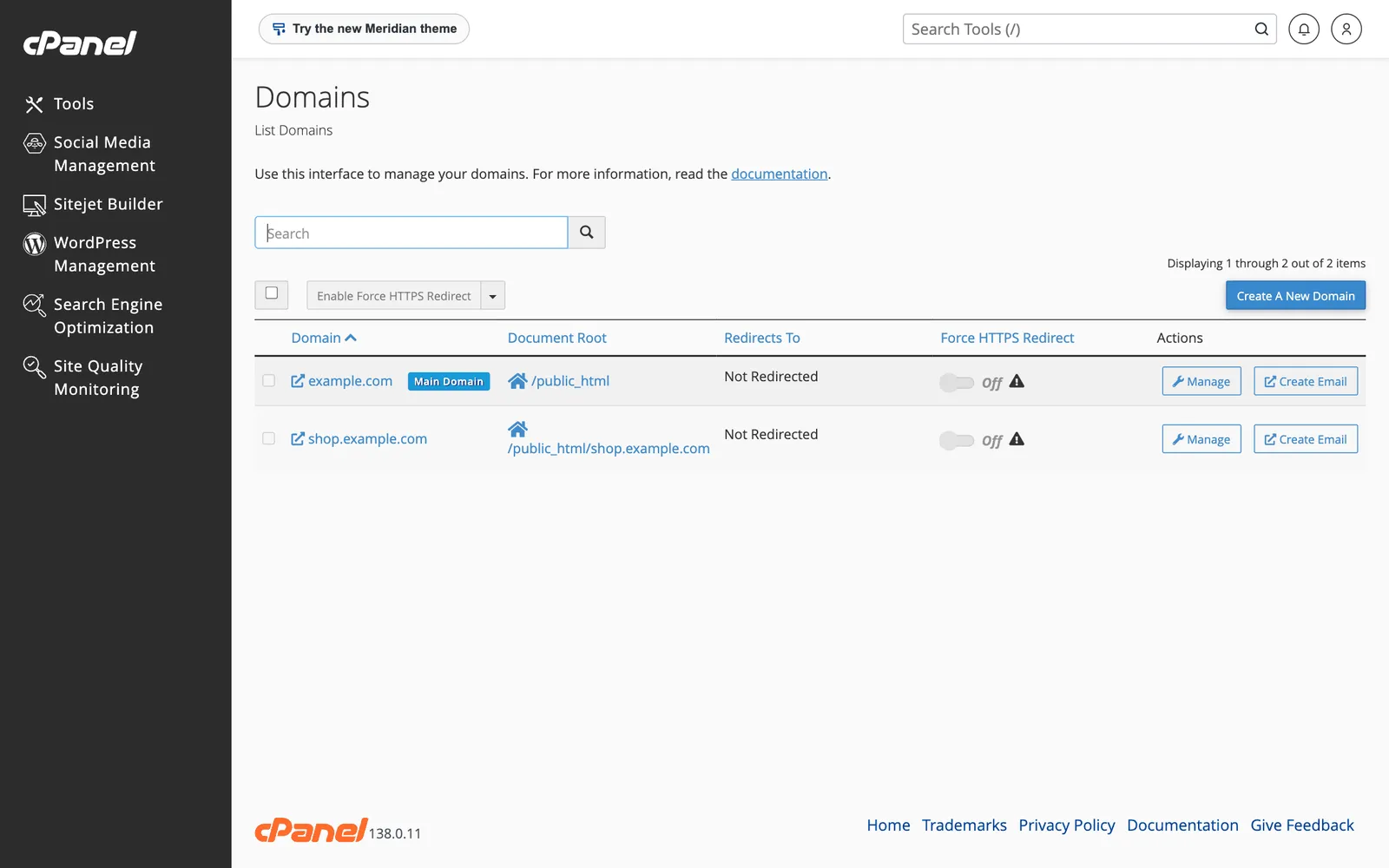
Each row shows the domain’s document root: the folder its files are served from.
Create a domain
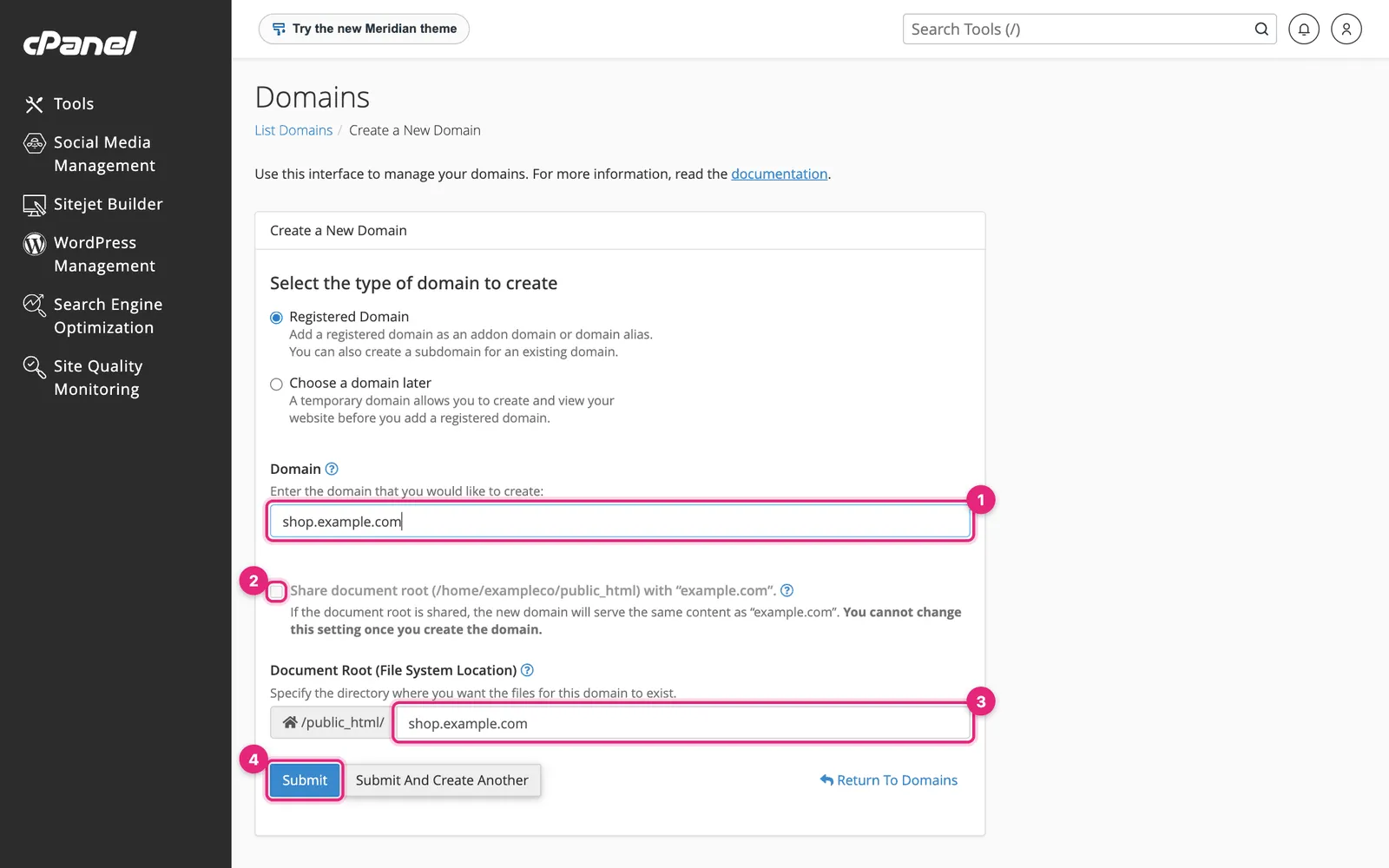
- Domain: type the full name, such as
shop.example.comfor a subdomain orexample.netfor a separate website. - Share document root: leave this unticked for a separate website. Tick it only to make the new domain show the same site as your main domain, an alias.
- Document Root is the new site’s folder, filled in for you, such as
public_html/shop.example.com. You can shorten it, but you cannot change it after creating the domain. - Click Submit.
Which kind do you need?
| You want | Type | Example | Share document root |
|---|---|---|---|
| A separate website | Addon domain | example.net | No |
| A section on its own address | Subdomain | shop.example.com | No |
| A second name for the same site | Alias (parked domain) | example.co | Yes |
Your hosting plan limits how many of each you can add. The home screen’s Statistics panel shows how many are left.
Make the new domain work
Creating the domain in cPanel tells the server to answer for it. Visitors still need DNS to send them here:
- A subdomain of a domain whose DNS is in cPanel works straight away; cPanel adds the record.
- A separate domain needs its nameserversNameserver The server that holds all of a domain’s settings. Whoever runs your nameservers controls where your website and email point. More about Nameserver → pointed at your host, or an A record pointed at your account’s Shared IP Address (shown on the home screen). See how to point a domain to a server.
- DNS hosted elsewhere needs an A recordA record The line in a domain’s settings that says which server’s address to send visitors to. Like a forwarding address card for your website. More about A record → added there for the new name.
Once DNS points here, AutoSSL issues a certificate within a few hours. Then turn on Force HTTPS Redirect. See SSL in cPanel.
Redirects
To send one address to another, use Domains » Redirects:
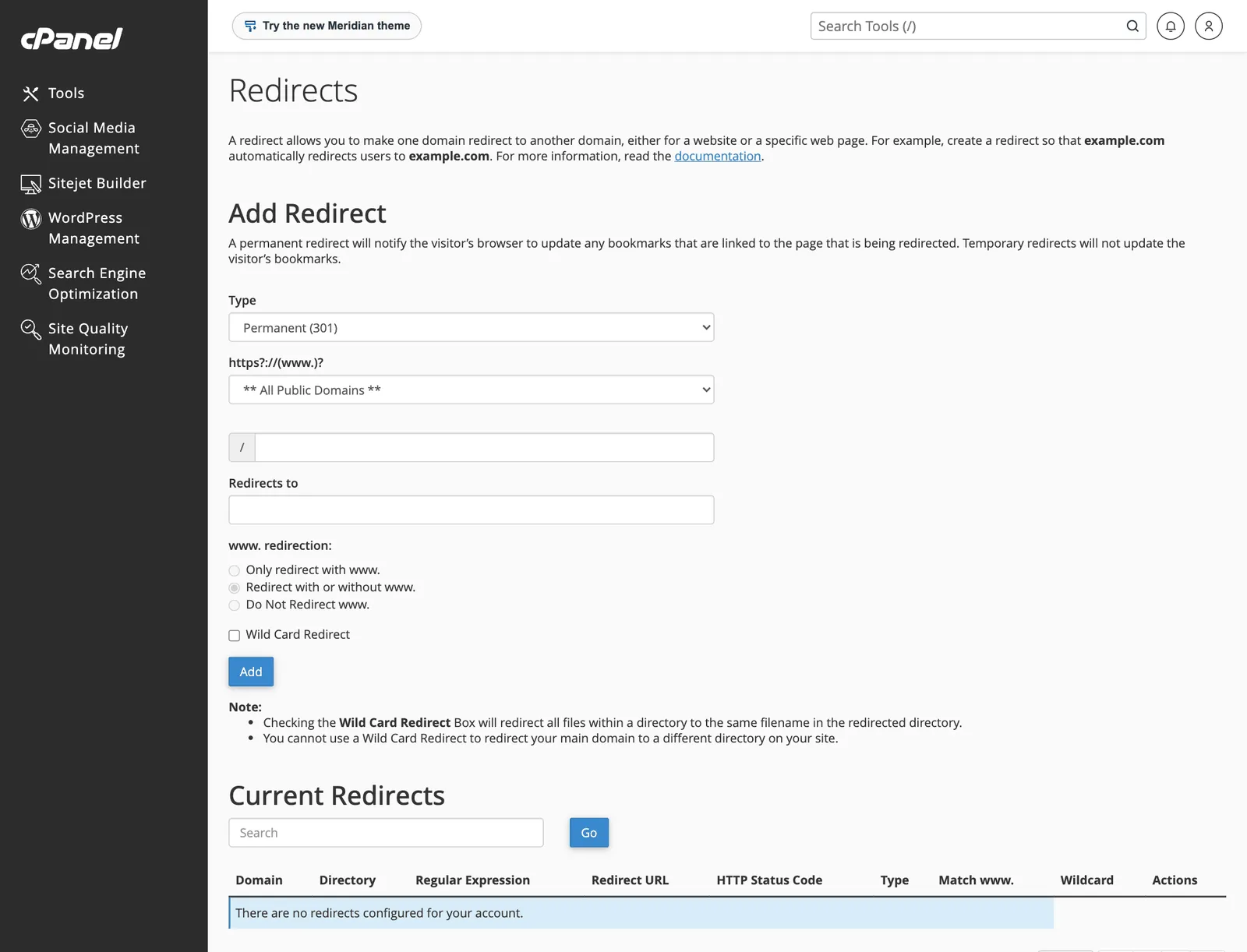
| Field | Choose |
|---|---|
| Type | Permanent (301) for moves you will not undo; it passes search rankings to the new address. Temporary (302) for short-term changes |
| Domain and path | The address to redirect from. Leave the path empty to redirect the whole domain |
| Redirects to | The full destination, including https:// |
| www. redirection | Usually Redirect with or without www. |
| Wild Card Redirect | Tick to send /old/page to /new/page, keeping the rest of the address |
cPanel writes these rules into the domain’s .htaccess file. If a site already has its own redirect rules, such as a WordPress SEO plugin’s, set redirects in one place only, or they can loop. See ERR_TOO_MANY_REDIRECTS.
Official documentation
- Domains, cPanel documentation.
Related
- How to install WordPress in cPanel.
- Subdomain in the glossary.
Something out of date? Software changes. If a step no longer works, tell us and we will check it and update the page.